Thursday, March 24, 2011

Cricut Circle Blog Challenge #25: Use Your Imagine-ation

Weekly Challenge #25: Use Your Imagine-ation Challenge!
The Challenge: Strut your stuff using your Cricut Imagine Machine. Don’t own one yet? No problem! Include some sort of clip art on your project in it’s place.


I needed to get my birth announcements and thank you cards ready for the upcoming birth of our daughter and knew this was the perfect opportunity to get these done. I had already bought a kit that came with both the announcements and thank you cards, but I did not think they were cute or decorative enough. No problem...my Imagine came to the rescue!

I used the Nursery Tails cartridge for all of my cuts. I used the image of the lamb on page 27 and the butterfly layer from page 20 for the announcements. I cut an extra scallop in a different pattern and at .2 bigger then the combined lamb cut so I could give it some dimension without gluing all the tiny pieces. I also used a pop dot on the butterfly and curled the wings before adding it to the announcement. I sponged the edges of the card with SU craft ink in Pretty in Pink and added a gingham ribbon bow in SU Light Pink. ***Note: the picture is not of my baby nor is the info correct, it's just the prototype of what the final will look like once all the correct information is entered. I cut enough for 50 announcements, so all I will need to do is adhere the pieces once she is here. =)

To the thank you cards, I used the same butterfly (edges curled) from page 20 in addition to the lamb (pop dot added for dimension) and grass layers from page 4. I sponged the edges in the same SU craft ink, used a cuttlebug folder to emboss the front of the card, used the same gingham ribbon to wrap the card and make a bow and finally, used pink Stickles to highlight a few of the raised dots. I also added the bib from page 13 to the inside of the card in the center of the negative embossment from the front of the card (no pic added).

I love the way I was able to easily use my Imagine to add such a decorative touch to the announcements and thank you cards. The cuts really added an expensive and designer look to them that they otherwise would not have had!

Thursday, March 17, 2011

Cricut Circle Weekly Challenge #24: St. Paddy's

Weekly Challenge #24: St. Paddy’s Challenge!
The Challenge: Use rainbow colors OR a monochromatic green color scheme on your project. We also want to see you add a touch of gold somewhere on your project.


I used Juliana's Michaels layout from the circle blog weekly example as my inspiration. Actually, I pretty much scraplifted it! =) I hope she doesn't mind....
Once it was completed, I realized it needs more "umph". I will go back and add more cutesy layers to finish it off. I will then repost the "improved" image.

Texas Stampede Free Make and Takes!!!

Some of you may not know this, but I am pregnant and due on March 29th with a baby girl! Recently, we had a pre-labor scare and I was put on "house rest". My Dr. has lifted some of my restrictions, but I am supposed to still take it easy so I won't preemptively go into labor. Due to my situation, I decided to create two free make and takes for the stampede to prompt those attending to come visit me at the luncheon and the stampede at the table I will be sitting at.

I know...it's bribery, but I would love to meet all of you and trade ribbon and calling cards! I just can't stand the entire day and need to sit as much as possible.

So, here are my bribes:

My calling card for the luncheon at La Hacienda is the white portion of the card with the ladybug. The ribbon used is the ribbon I will be trading for the ribbon swap. If you come find me to swap ribbon, you will get everything you need to make this card in a mini kit! All you will need is your own adhesive. I have 50 of these to trade.
*** I will also have an alternative calling card on hand to trade with those not swapping ribbon. There are 50 of these.

My next bribery is a make and take at my table to create a mini-gem magnet:

I have 100 "special" calling cards to trade at the Stampede. We can trade cards at my table while you create your mini-gem magnet!

All in all, I have created 200 calling cards so I should have enough to trade with everyone and enter the drawings. I can't wait for Friday and am SO excited to meet all of you attending.
Please come see me! =)

INSTRUCTIONS ON HOW TO MAKE GEM MAGNETS:

This is not an original idea. I actually made them many moons ago, but they are a fun and easy project to make. You can use these mini-gems on a locker, file cabinet, fridge...anywhere a magnet will stick to. You can personalize them with your favorite theme, mini-picture, monogram...just about anything. They also make really cute gifts as a set!

1. Step One ~ Materials
- Glass gems (usually found in the floral department...round and flat on bottom side)
- Magnets (I use 1/2 inch diameter magnets)
- An image (can be printed, a mini-picture, a piece of fabric, etc.)
- Adhesive (glue to adhere the image to the magnet and clear silicone or your favorite liquid effects)

2. Step Two ~ Cut out the image
You can trace the gem over the image and cut or use a punch in the correct size.

3. Step Three ~ Glue image to the magnet
Utilizing your favorite glue adhesive, glue your image to the magnet. I use Elmer's Rubber Cement because the brush evenly spreads the adhesive.

4. Add the silicone or liquid effects
Add a small dollop of your selected adhesive to the face of the image. Not much is needed, less is more in this case.

5. Add the gem to the image
Place your gem on the image and press until the silicone or liquid effects spreads to the edge of the image. Wipe off any excess adhesive. Silicone will take longer to dry, usually overnight. Liquid effects will dry much faster.

That's it! Simple. The curve of the gems will give your image a magnified look, much like a bubble. Experiment with different images and patterns. A fully colored image looks best due to the bending effect around the edges, but once more...create what you like!
Now aren't you excited to give this a try????

Tuesday, March 8, 2011

Cricut Circle Weekly Challenge #23: Guy Stuff

Weekly Challenge #23: Guy Stuff Challenge!
The Challenge: Incorporate atleast three of the following types of materials on your project. (Hardware items, stars, raw cardboard or chipboard, twine, string, paint, buttons, staples, or distressed edges)


This is a LO of my "little man" getting his first haircut. He was SO good. He just sat there and let the hairdresser groom him.
The 3 elements I chose were distressed edges, staples & hardware. The cart used for all the cuts was Billionaire.

Tuesday, March 1, 2011

Cricut Circle Weekly Challenge #22: Once Upon a Time

Weekly Challenge #22: Once Upon A Time Challenge!
The Challenge: Include a Fairytale or Folklore figure in your project (princesses, gnomes, etc.)

For this challenge, I decided to break out of my box in two ways:

1. I would do something NOT so cutsie.

2. I would ONLY use my Imagine.

The folklore figure I selected was a dragon. All the papers and cuts were printed and pulled from the Imagine cart JT. I plan on putting pictures of my nephew skateboarding on the 12x12 layout.

I pop dotted all the layers of the dragon (a total of 4 layers). This makes it pretty thick and very expensive looking (if I were to buy a 3-D sticker of this kind). I also layered the banners (where I will journal on). Lastly, I did some minor embellishing with red and black Stickles.

Baby Girl Layout

I like to use my scraps from a project and create a new project while all the materials are out. I created this 12x12 layout of my niece using my scraps from the banner project posted earlier this week.

Isn't Analisa a cutie! =)


Sunday, February 27, 2011

Cricut Circle Monthly Challenge: Banners!

FEBRUARY MONTHLY CHALLENGE: BANNERS!
Banners are everywhere! We love their versatility and the way they can be customized for any occasion. For this challenge, we want you to create a banner with any theme you would like. You may use THIS POST as inspiration, or feel free to create something completely new. Project must be newly created for this challenge.


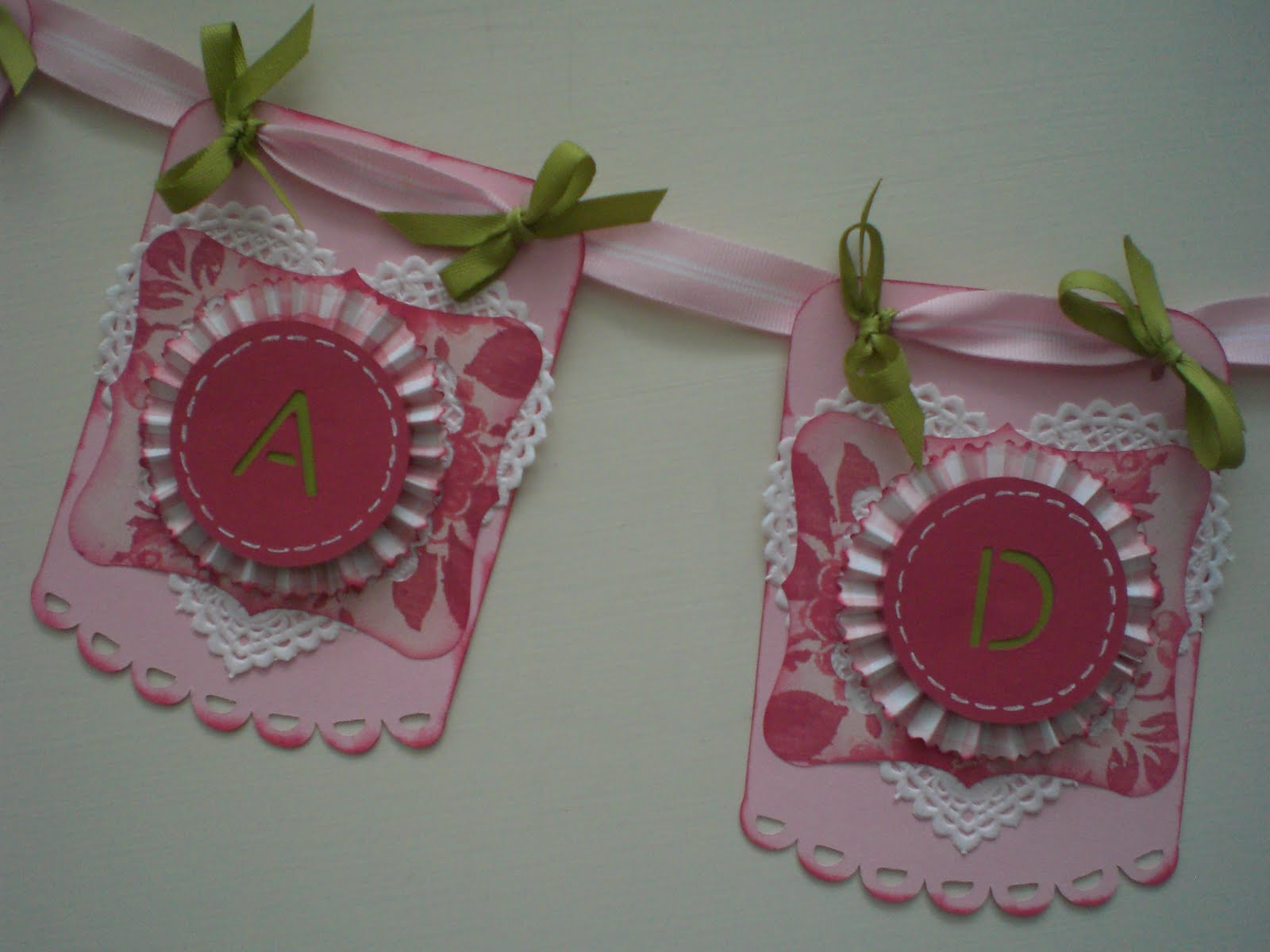
For this challenge I decided to create a welcome banner for our baby girl due at the end of March. I wanted it to be girly, shabby chic, and not too babyish so I could use it in her room once we get home from the hospital.

I used two carts for my cuts. I cut the banner pieces and one of it's layers at 5.4" from Sugar and Spice and the monograms from Simply Sweet at 2". The heart is a pre-cut paper doily and the pinwheels were made from 1.5" x 12" strips with the .25" cut off when edged with wave scissors. All the cuts were edged with craft ink in Ruby Red from SU. The cardstock is from SU (Ruby Red & Old Olive), PC (pink textured), and DCWV (patterned papers). The ribbon used is in Old Olive (SU), Pink Pirouette (SU) and white (AC). I also added large eyelets to the banner ribbon on each end to prevent damage and make it easier when hanging. I then tied accent ribbon to the these eyelets and each individual banner piece.

I can't wait for my little one to arrive!

Thursday, February 24, 2011

Cricut Circle Weekly Challenge # 21: Animal Magnetism

Weekly Challenge #21: Animal Magnetism Challenge!
This week we have been paying tribute to the critters in our lives and now we want you to do the same! For this challenge your project must include something related to an animal. You can create your project for or about an animal, include an animal cut, use animal print, etc. Project must also contain atleast 2 Cricut image cuts to qualify.


I am SO behind in my scrapbooking that for this challenge, I decided to work on some of my older photographs. These pics come from a road trip vacation we took in 2007. On our way to the Blue Ridge Mountains, we decided to make several roadside attraction stops (if your going to do it, then do it all the way...right?). We stopped at the "Big Cow", "World Globe", and "America's Smallest Church".
Supplies:
* Most of the cuts are from the cart Summer Vacation, but I did list the other carts that I took a cut or so from (Inspired Heart, Country Life & My World).
* Stampin Up Cardstock
* DCWV Travel Stack
* SU brads
* Red Stickles
* Diamond? cuttlebug folder
* Expresso SU marker
* White gelly pen

Monday, February 14, 2011

Cricut Circle Weekly Challenge #20: Love Notes

Weekly Challenge #20: Love Notes Challenge!
Valentine’s Day is just a few days away and we thought it would be fun to challenge you to put your scrappy skills to use by creating an extra special note for someone you adore. It can be a friend, your mom, a lover, your child, a neighbor . . . anyone! Your project must include a heart and embossing (we want to see you incorporate those Cuttlebug embossing folders). Project must also contain atleast 2 Cricut cuts to qualify.


This is the valentine I created for my hubby. The label, label frame and card hearts are cut from Fabulous Finds. The heart eyelet holders are cut from Tags, Bags, Boxes and More. I used the argyle and Queen of Hearts embossing folders to embellish the card along with some gold cord and black eyelets. The cardstock, designer paper and stamp are from SU.